How to build an MCP server, with examples and use cases from my own app
How to build an MCP server is a playbook on what the Model Context Protocol is, how an MCP server differs from an API, and how to add one to an existing web app in 8 steps, with OAuth sign-in, tool descriptions that carry the rules, and a review screen for every write.
I believe almost every app today needs an easy way for AI agents to talk to it.
A plain API can do that, but then someone has to connect it to each AI tool. MCP (Model Context Protocol) is the open standard for this. You build one server, and any app that supports MCP, such as Claude or ChatGPT, can connect to it.
Building one can feel like a "where do I even begin?" project. It's actually not that complex, and I'll walk you through every step, starting with what MCP even is.
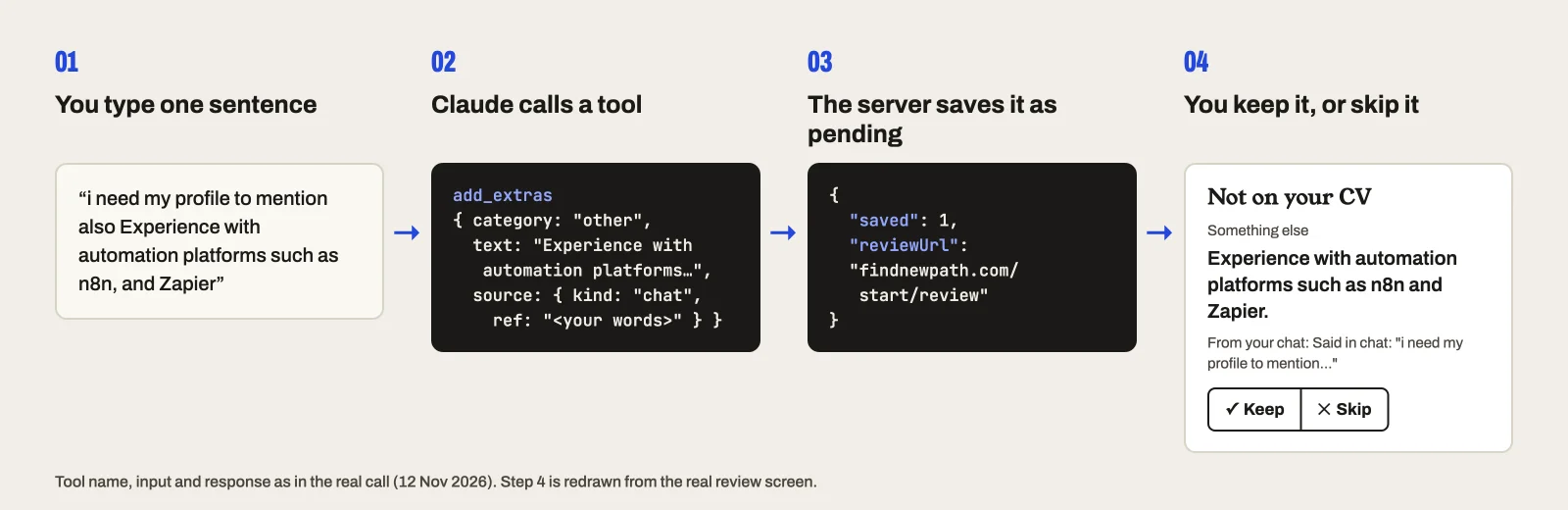
My example is the server I built for findnewpath (opens in a new tab), the app I'm building for people changing careers. It starts from your CV and what you tell it, and suggests directions to explore. The server lets Claude add to my profile there: I type one sentence in a chat, Claude calls a tool, and the item waits in the app until I press Keep.
At the end there is a prompt you can give your coding agent. It finds where MCP fits your app, then builds a first version.
What is MCP?
MCP (Model Context Protocol) is an open standard for connecting AI applications to external systems. The official docs (opens in a new tab) compare it to a USB-C port: one standard plug in place of a different cable for every device.
Three words cover most of it:
- Host: the AI app, such as Claude Code, Claude Desktop or VS Code.
- Client: the part of the host that keeps a connection to one server.
- Server: your program. It can offer tools (functions the model can call), resources (data the app can read) and prompts (templates the user picks).
A server can run locally on the user's machine or remotely over HTTP. This guide builds a remote one, as a route inside a web app.
A tool is a function the model can call, such as searching, querying a database or saving something. Each tool has a name, a description of what it does and when to use it, and a schema for its inputs. The model reads those and decides on its own when to call it.
Think of a restaurant menu. Each dish has a name, a short description and choices to fill in, like size or sides. You tell the waiter what you feel like, and the waiter reads the menu and places the order. Your tools are the menu. The model is the waiter.
The MCP docs give examples like these:
- A travel app: search flights, with where from, where to and the date as inputs
- A messaging app: send a message, with who to and what to say
- A calendar: create an event, with a title and a time
One of mine is add_extras: it suggests something to add to a findnewpath profile, with the text and where it came from.
Mine offers only tools. That's enough to start.
How is an MCP server different from an API?
An API (Application Programming Interface) is written for a developer. Someone reads your docs, writes a client and decides in code when to call each endpoint.
An MCP server is written for a model. The client asks the server which tools it has (tools/list) and gets back each tool's name, description and input schema. The model reads those and decides when to call one (tools/call). Nobody writes a client for your server, because the host already has one.
Back to the restaurant: with an API, a developer reads the menu once and writes your order into code. With MCP, the waiter reads the menu fresh in every conversation.
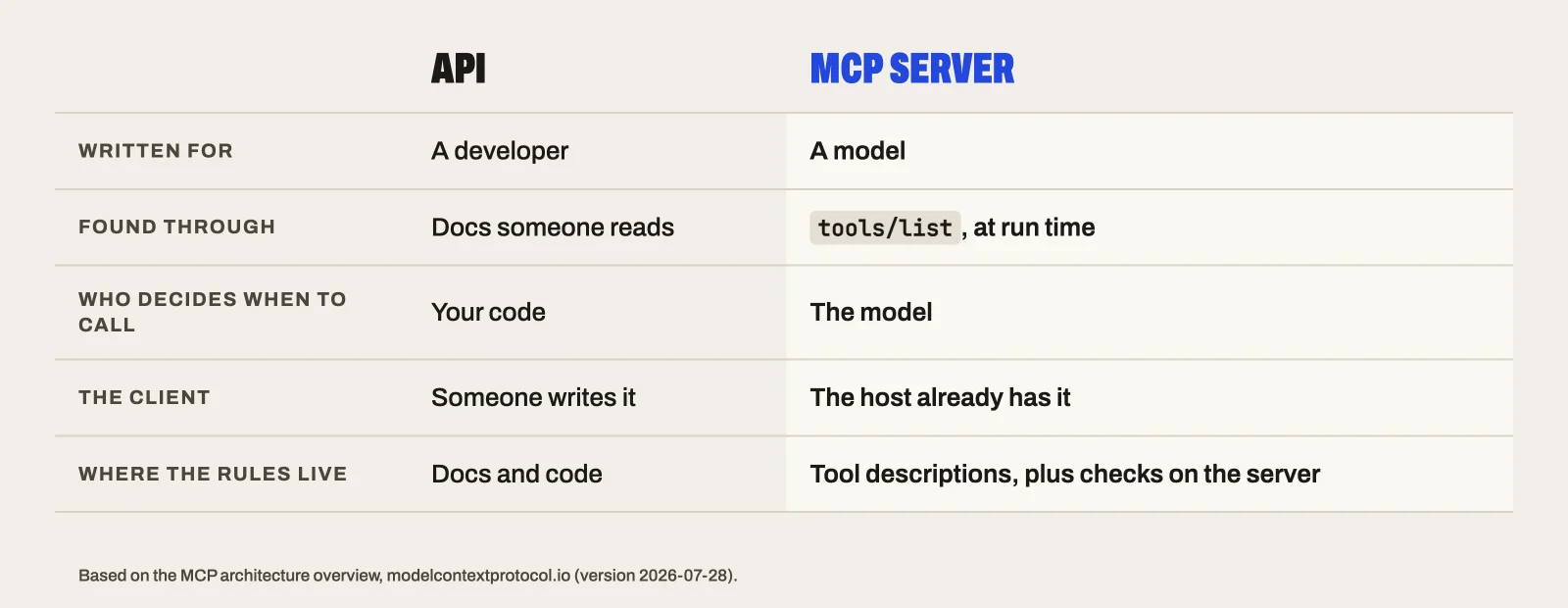
Two things follow from that:
- Your tool descriptions are the documentation, and the model acts on them.
- You build once. The docs name Claude, ChatGPT, VS Code and Cursor among the apps that support MCP.
An MCP server doesn't replace your API. Mine reuses the app's own code to work out what a profile is missing.
When to add an MCP server, and when not to
Add one when:
- People already use AI assistants, and your app holds data or actions they'd want there.
- A chat can do part of the job better than your screens. For findnewpath, that's reading someone's emails and documents, with their OK, to find feedback and side projects they'd never think to type in.
- You want one integration that works across AI apps, not one per app.
Skip it, or wait, when:
- Only your own code will call it. A plain API is simpler.
- It must happen the same way every time. The model decides whether to call a tool, which one and with what inputs, so two runs can differ. For a nightly sync or a payment, call your code directly. Your server's checks stay exact; the model's choices don't.
- The job needs your screens. I didn't build swiping role cards in chat, because the app does that better.
- You can't yet control what a connected app can reach. My first commit got this wrong (more below).
- The action can't be undone. Let the model suggest it and a person confirm it, or don't offer it yet.
How much work it is
- The SDK handles the protocol. I never wrote a JSON-RPC message.
- It's a route in the app you already have. Mine is 4 lines. There is no new service to run.
- Sign-in is standard OAuth. My auth provider, Supabase Auth, already had an OAuth server. If yours has none, sign-in becomes the biggest step, so check that first.
The whole MCP layer is 480 lines: the server, the token check, the database access and the metadata routes. The protocol is the small part. The real work is deciding what the tools are allowed to do.
Before you start
- An app with accounts and a database. Mine is Next.js 16 with Supabase.
- An auth provider with an OAuth server. Supabase Auth has one.
- Three packages:
mcp-handler,@modelcontextprotocol/serverandzod. - Something to test with: the MCP Inspector, then a real host. I used Claude Code.
1. Pick one job for the assistant
Choose something a chat does better than your screens. I picked the four parts of a findnewpath profile that a CV doesn't cover: things you did that aren't on it, what other people said about you, how hands-on you are with each skill, and how each kind of work feels. An assistant can read the person's own documents, with their OK, and suggest answers.
I wrote down six use cases and built the first. Sending a CV from the chat came later the same day.
Decide what the server can't do, too. When I asked Claude to get me to my final three roles, there was no tool for that, so it pointed me to the app. That is the scope doing its job.
2. Add the endpoint to your app
Install the packages:
npm install mcp-handler @modelcontextprotocol/server zodThen write the server. This is a complete one with a single tool, in src/lib/mcp/server.ts:
import { createMcpHandler } from "mcp-handler";
import { z } from "zod";

export const mcpHandler = createMcpHandler((server) => {
  server.registerTool(
    "say_hello",
    {
      title: "Say hello",
      description: "Say hello to someone by name. Use it when the user asks for a greeting.",
      inputSchema: z.object({ name: z.string() }),
    },
    async ({ name }) => ({ content: [{ type: "text", text: `Hello, ${name}.` }] }),
  );
});
The route is src/app/api/mcp/route.ts. This is the whole file:
import { mcpHandler } from "@/lib/mcp/server";

// The MCP endpoint for AI assistants (Claude, ChatGPT). Stateless: GET and DELETE answer 405.
export { mcpHandler as GET, mcpHandler as POST, mcpHandler as DELETE };
Run the app. Your server is at http://localhost:3000/api/mcp, and at https://yourapp.com/api/mcp once you deploy.
3. Describe each tool for the model
A tool is a name, a description, an input schema and a function. This is one of my seven, trimmed:
server.registerTool(
  "add_extras",
  {
    title: "Suggest things not on their CV",
    description: [
      "Suggest things they've done that aren't on their CV: people they managed or mentored, things they started, what people come to them for, awards, volunteering and side projects.",
      "Call get_open_questions first.",
      "Add only what their own sources or their own words support. Write `text` plainly, in their terms, without inflating it. Ask them when you're unsure.",
    ].join(" "),
    inputSchema: items(ExtraPayloadSchema.extend({ source: SuggestionSourceSchema })),
  },
  async ({ items }, ctx) => {
    const info = auth(ctx);
    if (!info) return fail("Not signed in.");
    const rows = items.map(({ source, ...payload }) => ({ kind: "extra", payload, source }));
    if (!(await forUser(info.userId).addSuggestions(info.clientId, rows))) return fail("Couldn't save these. Try again in a moment.");
    return json({ saved: rows.length, reviewUrl });
  },
);items, auth, fail, json and forUser are small helpers in my file: the input shape, who is calling, how to answer, and database access scoped to one person.
Of the seven tools, one reads what's missing, five suggest something, and one returns the link to the review screen.
4. Put the rules in the descriptions
The description is where you tell the model how to behave. These lines are from my server's instructions and tool descriptions:
- "Call get_open_questions first to see which parts of their profile are thin, then fill only those."
- "
quotemust be word for word from the source, or exactly what they told you someone said. … If you can't quote it exactly, leave it out." - "Never infer energy from a CV, documents, emails or how good they are at it. If they haven't said, ask them."
They work. In my last session Claude called get_open_questions first. Nothing was missing, so it added nothing. Later I pasted eight soft skills from a job ad and asked for my profile to show them. Claude didn't send them. It matched each one to evidence already in my profile and proposed three concrete lines.
Don't rely on the description alone. rate_skills only accepts skills from the person's unrated list, and the server skips anything else and says why. Every write must carry a source that says where it came from.
The description asks. The server checks.
5. Add sign-in with OAuth
Every call to my server needs a signed-in person. Three pieces do it:
withMcpAuth(handler, verifyToken, { required: true })wraps the handler and refuses calls without a valid token.- A metadata route at
/.well-known/oauth-protected-resource/api/mcptells the client which sign-in server to use. It is 8 lines. - A consent screen in the app, where the person signs in and allows the connection. Mine shows the site they'll be sent back to, because anyone can register an app under any name.
In Supabase, turn on the OAuth server and dynamic client registration under Authentication, OAuth Server. Registration is what lets a client such as Claude sign itself up without you adding it by hand.
If your auth provider has no OAuth server, this is your biggest step. Check before you start.
One rule matters most: the user id comes from the verified token, never from the tool's input.
6. Decide which writes need approval
In findnewpath, a profile should hold only what the person confirms is true, so my tools don't write to it. Each item goes into its own table with the status pending and its source. The review screen lists them under "Suggestions to check", each with where it came from and two choices: Keep or Skip. Only kept items are added.
It works like suggested edits in Google Docs: the change shows up, but it isn't part of the document until you accept it.
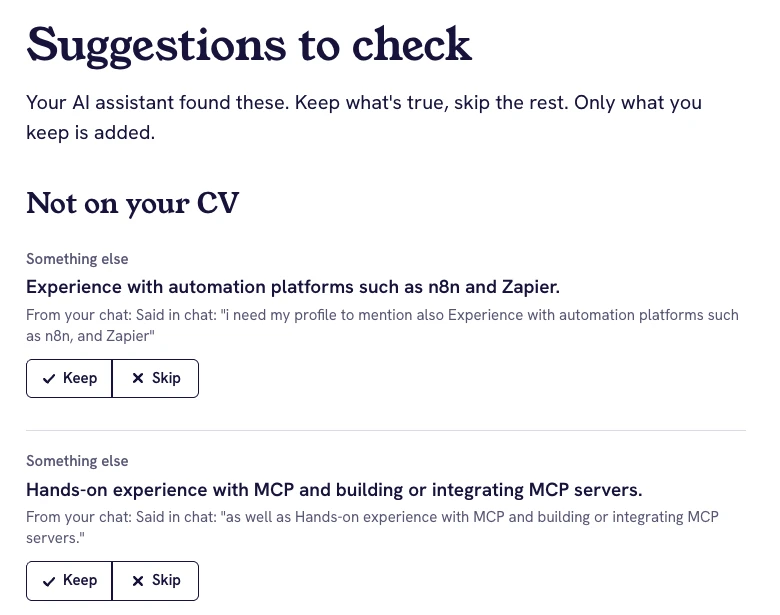
The MCP docs say tools are model-controlled and point to human oversight, such as approval dialogs in the host. The host may ask before a tool runs. My app asks again afterwards, on its own screen, where the person sees exactly what would be added.
This is the right choice for my app, not a rule for every server. If a wrong write is easy to spot and undo, such as adding a task to a list, a tool can make it directly. If it is about a person or money, or it can't be undone, hold it for approval.
7. Test it, then connect it
Start with the MCP Inspector, the official tool for testing servers. It connects the way a host would, lists your tools and lets you call each one by hand, so you see exactly what goes in and what comes back:
npx @modelcontextprotocol/inspector --server-url http://localhost:3000/api/mcp --transport httpIt opens in your browser and needs Node 22.19 or newer. You should see your tools listed, and a call to say_hello with the name Dana should answer "Hello, Dana." The docs say it can run the OAuth sign-in for a server that needs it.
Then connect a real host. In Claude Code, with your own name and URL:
claude mcp add --transport http findnewpath https://findnewpath.com/api/mcpThen run /mcp, choose the server and choose Authenticate. A browser opens for sign-in and consent.
Here is what a real call looks like in Claude Code:
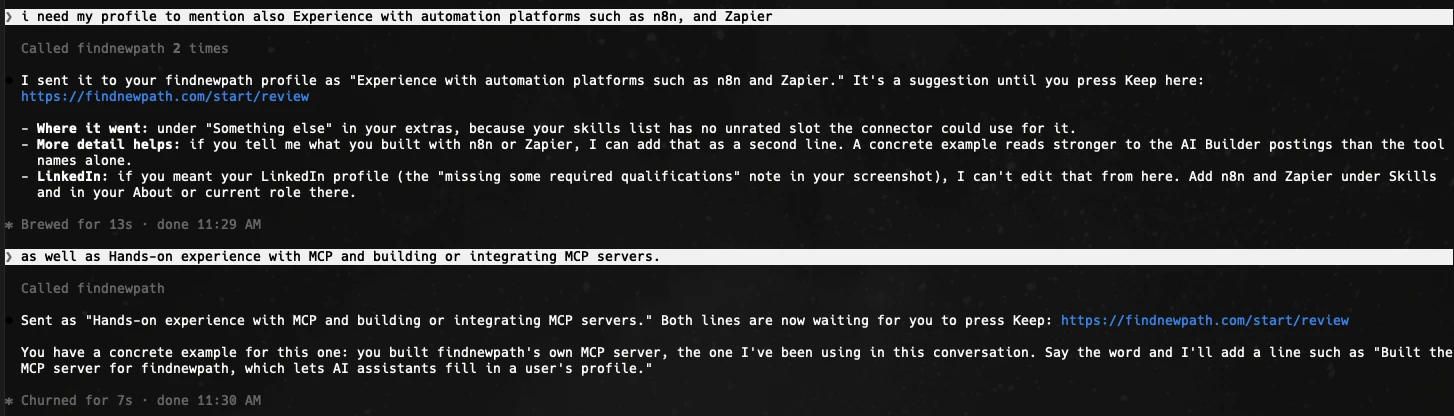
For the first sentence, I typed: "i need my profile to mention also Experience with automation platforms such as n8n, and Zapier". Claude called add_extras with a cleaned-up line, "Experience with automation platforms such as n8n and Zapier.", the category other and the source { "kind": "chat", "ref": "Said in chat: <my words>" }. The server answered:
{ "saved": 1, "reviewUrl": "https://findnewpath.com/start/review" }The line waited on the review screen until I pressed Keep. Now it's in my profile.
The Inspector tests your code. A host tests your descriptions, because there a model decides what to call. Do both.
8. Add a skill for the workflow
The server holds the tools. A skill holds the method. Mine is an 87-line Markdown file that tells the assistant to ask which sources it may read, to show what it found before sending, and to finish with the review link.
The assistant reads Gmail or Drive with the person's own connectors. My server never touches those accounts. It only receives the suggestions.
What went wrong
My first commit gave connected apps too much access. A token that Supabase Auth issues to a connected app is a normal user token with one extra claim, client_id. My database rules said a signed-in user can read and write their own rows. So an app holding that token could have skipped my server and queried the person's tables directly.
The fix went in over the next 35 minutes, in two commits:
- A restrictive rule on every user table that refuses any token with a
client_id. - The server now does all reads and writes itself, scoped to the user id from the token.
- A database function that every migration adding a table now calls. It fails the migration if a user table is missing the rule.
A token for a connected app is still a token. Check what it can reach without your server.
Writing straight into the profile would have lost suggestions. The browser saves the whole profile at once, so it would have overwritten anything the server added. That's why suggestions have their own table.
I've only tested it in Claude Code so far. The protocol says it should work in other hosts. I haven't checked that yet.
A prompt for your coding agent
Paste this into Claude Code, Cursor or another coding agent, inside your app's repository. It stops after the first phase, so you choose the job before any code is written.
Read this codebase, then help me add an MCP server to it. Work in two phases and stop after the first. Phase 1: where MCP helps. Don't write code yet. 1. List what the app holds (data) and what it does (actions) that a person might want from an AI assistant like Claude or ChatGPT. 2. Suggest up to 3 jobs for an MCP server, best first. For each: who would ask for it, the tools it needs (name, one-line description, inputs), and whether each tool reads or writes. 3. Say what should stay out: anything that needs our screens, must run the same way every time (payments, scheduled jobs), or can't be undone. 4. Tell me how sign-in works today, and whether our auth provider has an OAuth 2.1 server that MCP clients can register with. If it doesn't, say so before anything else. Then stop and wait for me to pick one job. Phase 2: build the job I picked. - Add it as one HTTP route in this app, with the current official MCP SDK for our language. Read the SDK's current docs first and don't write from memory: the TypeScript SDK changed its package name and API in v2. - Write each tool's description for a model: what it does, when to call it, and the rules it must follow. - Enforce every rule on the server too. Never rely on the description alone. - Require sign-in. Take the user id from the verified token, never from tool input. - Check what a connected app's token can reach without going through the server (direct database or API access), and close it. - For each tool that writes, ask me whether it can write directly or should save a pending suggestion that the person approves in the app. Anything that can't be undone waits for approval. - Test it: list the tools and call each one with the MCP Inspector (npx @modelcontextprotocol/inspector), then tell me how to connect it to Claude Code. Show me the tool names and descriptions before you write the handlers.
The steps as a checklist
- Pick one job, and decide what the server can't do
- Add one route to the app you already have
- Describe each tool for a model: name, description, input schema
- Put the rules in the descriptions, and check them on the server
- Require sign-in, and take the user id from the token
- Decide which writes need a person's approval
- Test with the Inspector, then run one real call in a host
- Add a skill if the workflow has more than one step
Questions
What is an MCP server?
A program that offers tools, data and prompts to AI apps through the Model Context Protocol, an open standard. Any app that supports MCP, such as Claude or ChatGPT, can connect to it, so you build it once instead of once per AI app.
How is an MCP server different from an API?
An API is written for a developer, who reads the docs and writes a client. An MCP server is written for a model: the host asks the server for its tools at run time, and the model reads each tool's description and decides when to call it.
Do I need a separate service for it?
No. Mine is one route inside the Next.js app I already had, and the route file is 4 lines. The SDK handles the protocol.
Which TypeScript package should I use?
Version 2 of the official SDK, @modelcontextprotocol/server. I used it with mcp-handler and zod. Older tutorials use @modelcontextprotocol/sdk (version 1), where tools are registered differently.
How do I test an MCP server?
Call each tool by hand with the MCP Inspector, then connect a real host such as Claude Code and run one real call:
npx @modelcontextprotocol/inspector --server-url http://localhost:3000/api/mcp --transport http