Claude in Chrome: what it does and how I use it
Claude in Chrome: what it does and how I use it is a playbook on connecting Anthropic's Claude in Chrome extension to Claude Code, and using it to check every screen Claude builds at desktop and phone width, in the console and through the real flow, before you look at it yourself.
When Claude Code finishes a screen, I don't open the browser to check it anymore. Claude does. It opens the page in my own Chrome, looks at it at desktop and phone width, reads the console, clicks through the flow, and tells me what's broken before I see it.
Since mid-September I've used it in 93 Claude Code sessions. 65 of them opened a page running on my own machine to check something Claude had just built. Here's the setup, the check I ask for, what it caught, and where it still trips.
What Claude in Chrome is
Claude in Chrome is Anthropic's browser extension. Connected to Claude Code, it gives Claude browser tools: it opens tabs in your real Chrome, clicks, types, takes screenshots, and reads the console and the page itself. The tabs it opens go into a tab group for the session, in a visible window, so you can watch it work.
It uses your browser's logins, so it can open anything you're already signed into. When it reaches a login page or a CAPTCHA, it stops and asks you to handle it.
What you need
- A paid Claude plan: Pro, Max, Team or Enterprise.
- Claude Code, signed in with
/login. Sessions that use an API key or aclaude setup-tokentoken can't connect to the extension. - Chrome or Edge with the Claude in Chrome extension (opens in a new tab), version 1.0.36 or later. Claude Code also connects to other Chromium browsers, like Brave and Arc. It doesn't work in WSL.
Set it up
- 01
Install Claude in Chrome (opens in a new tab) and sign in with the same Claude account and organization you use in Claude Code.
- 02
Start Claude Code with Chrome:
claude --chrome - 03
Run
/chrome. It's connected when it shows "Status: Enabled" and "Extension: Installed". If the extension isn't found the first time, restart Chrome. - 04
To skip the flag next time, run
/chromeand choose Enabled by default.
The first time Claude acts on a site, Claude Code asks first, with a prompt that starts "Claude in Chrome wants to". You can allow that site for the rest of the session.
The check I ask for
I spent 12 years in QA, so I ask for the check I'd want from a tester: both widths, the console, the real flow, and nothing it can't undo. Change the address and the flow, keep the rest:
Open http://localhost:3000/pricing in Chrome and check it the way a tester would. 1. Look at it at 1440px wide and at 390px wide. If the window won't get that narrow, load the page in a 390px-wide iframe and check that. 2. Tell me about anything that scrolls sideways, overlaps, gets cut off or wraps onto an extra line. 3. Read the console and list any errors. 4. Click through [the flow] and tell me what happens at each step. 5. Keep the tab in front while you test animation or scrolling. 6. Don't sign in, pay, send or publish anything. Stop and ask me. For each problem, give me the width, what you saw and the code that causes it.
Step 1's iframe line and step 5 are there because of what went wrong before. More on that below.
What it caught
A few real ones from the last month, all in screens Claude had just built and called done:
- Coral (opens in a new tab)'s homepage: after I removed the Lifetime button, the Download button stayed in a slot built for two buttons. It sat at half width, and the line under it ran past it.
- Coral at 390px: hiding a line break on phones also removed a space, so the headline read "agents.From".
- Top Banana (opens in a new tab)'s checkout: the checkmarks rode up into the card border. shadcn's Card treats an image that comes first as a cover photo and strips the top padding.
- Top Banana's Next moves table: the post age column was squeezed, and the ages were cut off under the button.
- Top Banana's hero: changing "Win more deals" to "Win more customers" pushed "customers." onto a fourth line at 1280 and 1440px. On a phone, the button ended at about 666px, while Safari shows about 660px, so it sat under Safari's bottom bar.
- Top Banana's pricing: the yearly prices overflowed the starburst they sit in.
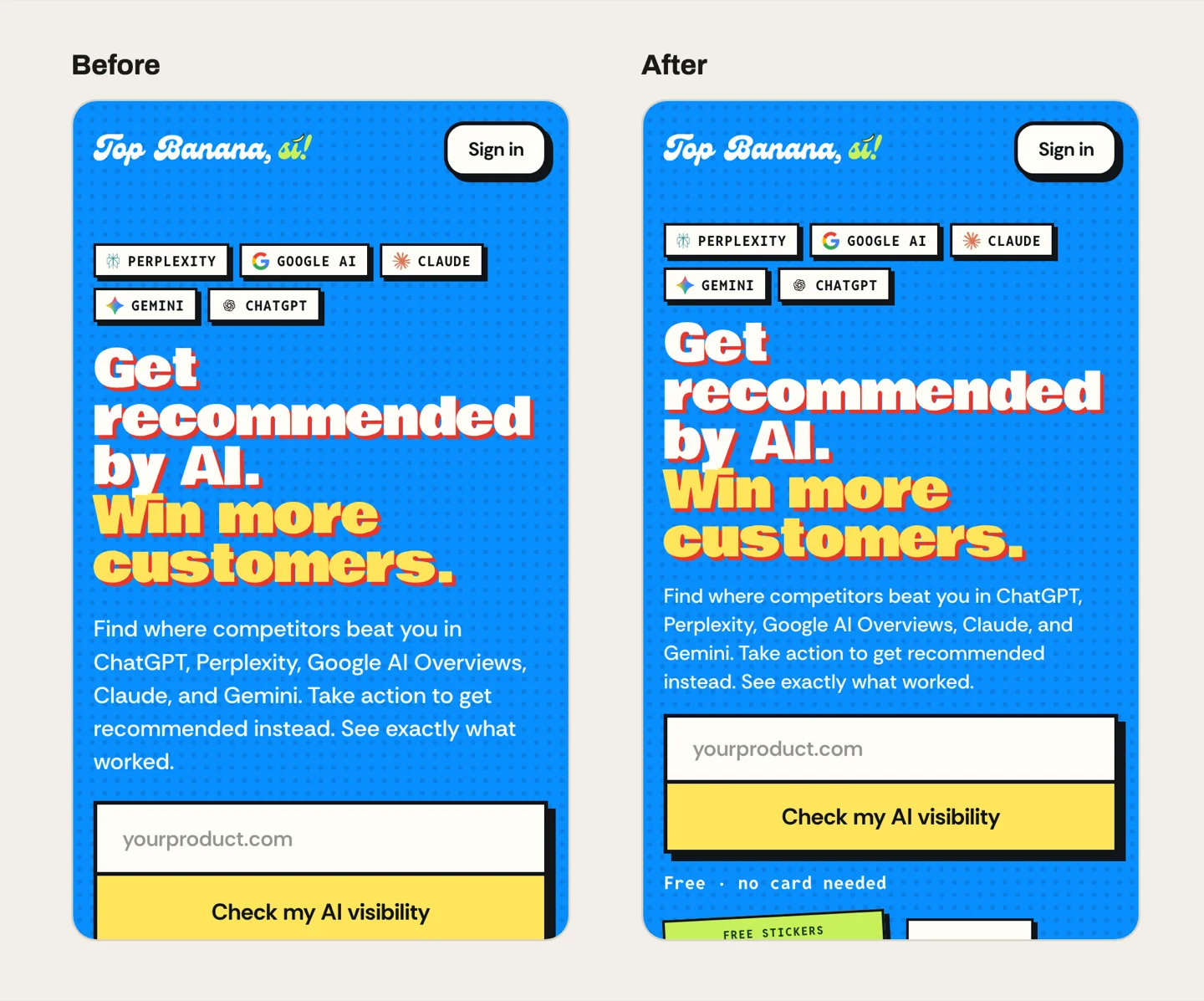
None of these would fail a type check or a test. They only show up when something looks at the page.
Where it trips
It doesn't always work, and a few of these failures come back often enough that the prompt has to plan for them.
- The window won't shrink. A maximized window, or Chrome's own minimum width, kept it from reaching 390px. Once it simply skipped the phone check, and said so only at the end. Now it loads the page in a 390px-wide iframe instead.
- Background tabs freeze animation. Chrome pauses animation in a tab you can't see. Claude reported a scroll effect as broken when the page was fine and the tab was just behind another one.
- Clicks and typing sometimes don't land. Claude checks the result, like a Save button that's still greyed out, and tries again. Ask it to confirm each step instead of assuming.
- It stops at sign-in. On topbanana.si it went as far as Google's account chooser and stopped, because picking an account would sign in as me. For pages behind a login on my own machine, I added a switch that skips sign-in in local development only.
When Claude says it checked the phone layout, ask at what width.
What I'd tell you before you try it
- Ask for both widths every time, and name them.
- Ask for console errors by name. Logs are long, and Claude reads them better when it knows what to look for.
- Keep the tab in front for anything that moves.
- Put the things it must never do in the prompt: sign in, pay, send, publish.
- Read its last message for what it didn't check. That's where the bugs are.
Questions
Is Claude in Chrome free?
No. It needs a paid Claude plan: Pro, Max, Team or Enterprise. It isn't available through Amazon Bedrock, Google Cloud or Microsoft Foundry.
How do I connect Claude in Chrome to Claude Code?
Install the extension from the Chrome Web Store, sign in with the same account as Claude Code, then start Claude Code with Chrome and run /chrome to check the connection:
claude --chromeDoes it work in other browsers?
Anthropic documents Chrome and Edge. Claude Code also detects the extension in other Chromium browsers, like Brave, Arc, Vivaldi and Opera. It isn't supported in WSL.
Can it use sites I'm signed into?
Yes. It shares your browser's login state. It stops and asks you when it reaches a login page or a CAPTCHA.
Why not Playwright?
I use both. Claude in Chrome runs in my real browser, with my logins, and I can watch it. When Chrome won't cooperate, Claude has switched to headless Chrome or Playwright for screenshots.