UI UX Pro Max
UI UX Pro Max (ui-ux-pro-max) is a skill by Next Level Builder that gives coding agents a searchable design database: UI styles, color palettes, font pairings, UX guidelines and chart types, across stacks from React and Next.js to SwiftUI, React Native and Flutter.
Notes by Lior Pesoa · Updated · Works with Claude Code, Cursor, Codex
Made by Next Level Builder.
Source: github.com/nextlevelbuilder/ui-ux-pro-max-skill · MIT license. Everything below is my review: I tested it myself.
npm install -g uipro-cli && uipro init --ai claudeVerdict
6/10
My scoreIt gives the agent a design direction it wouldn't pick on its own and adds more product detail, but the result still has tell-tale AI touches, it doesn't trigger by itself, and it doubles the time and cost.
Tested · v2.5.0
Pros
- Picks a design direction for the product type, instead of the agent's default look.
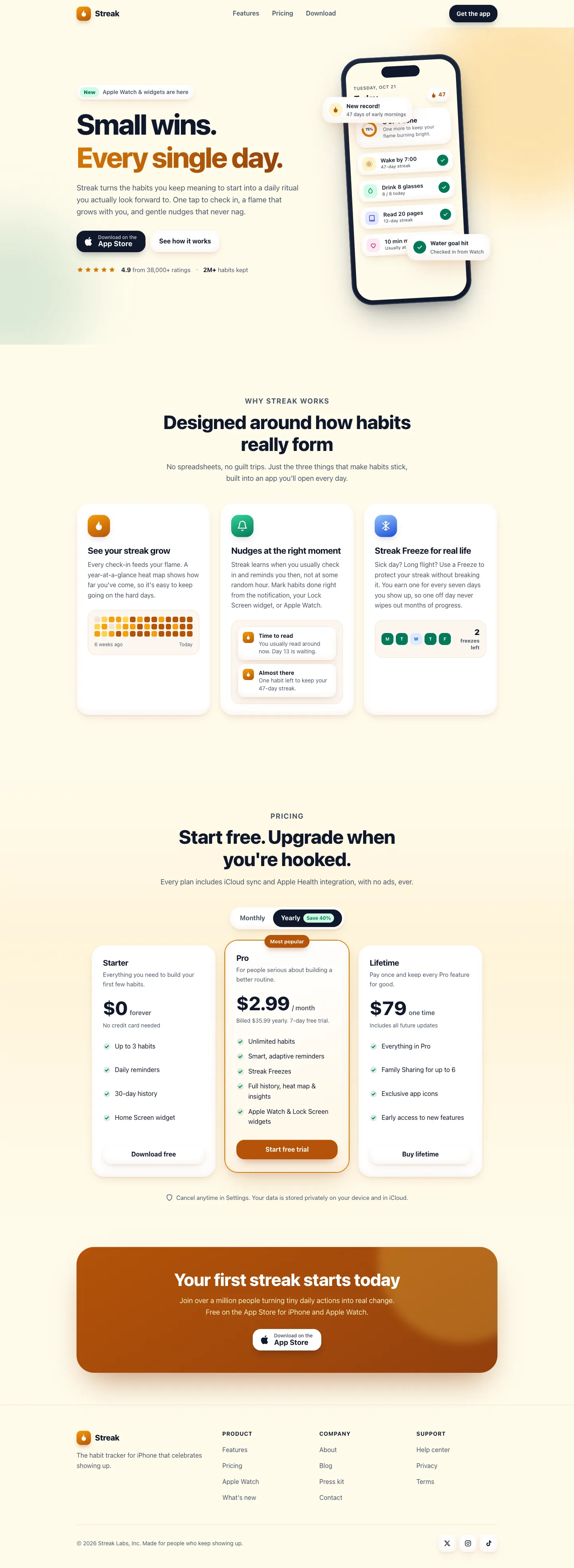
- Adds product-specific detail: in the test, a progress grid, notification previews and a monthly/yearly price toggle.
- One install covers web and mobile stacks, from React and Next.js to SwiftUI and Flutter.
- The rounded, pill-shaped buttons look good.
- Free and MIT licensed.
Cons
- Parts of it still look AI-made: notification cards floating over the phone mockup and covering its content, and soft color blobs in the corners that end in hard edges.
- Didn't trigger on its own in the test. I had to name it in the prompt.
- Took twice as long and cost twice as much as the same task without it.
- Needs Python 3, since the design search runs as a script.
- Best for
- Starting a new landing page or app screen when you don't have a design direction yet.
- Skip it if
- You already have a design system or a Figma file to build from.
The test
Same task, both runs
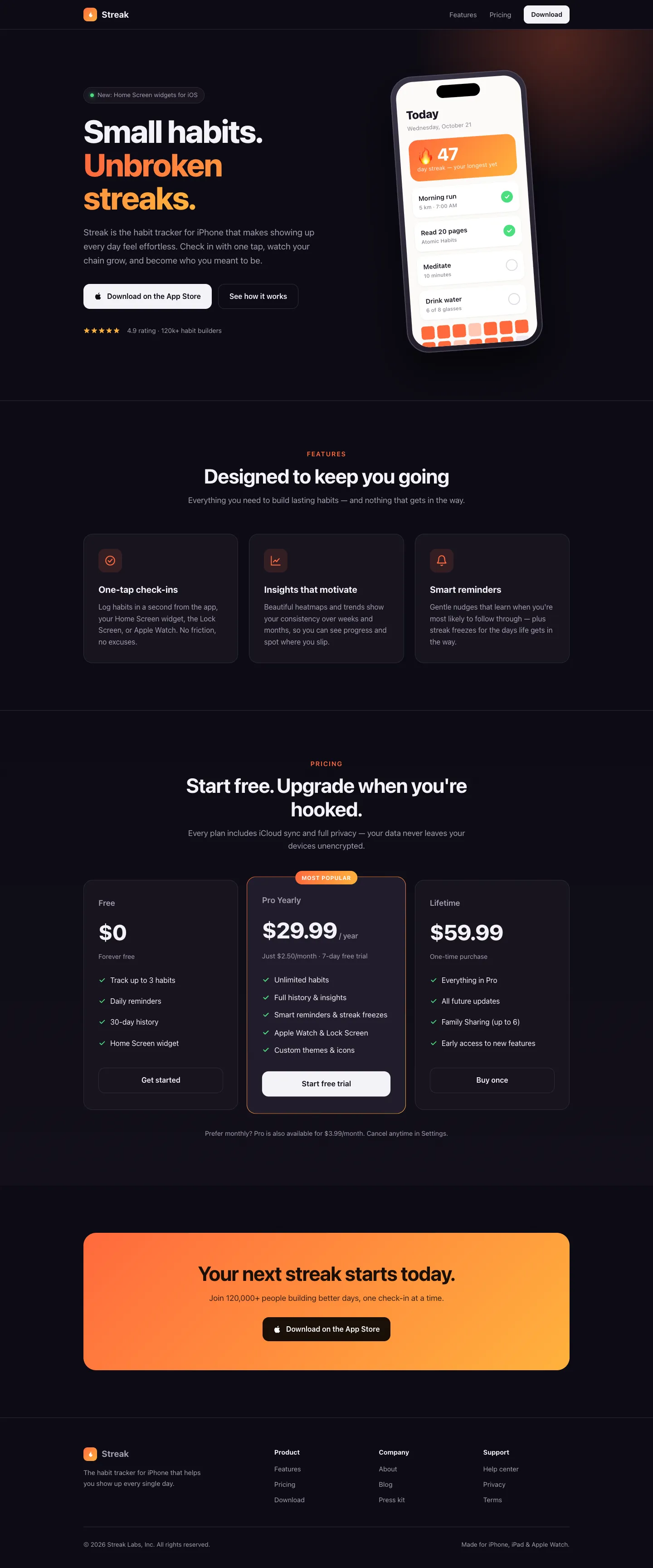
Build a landing page for Streak, a habit-tracking iPhone app. Write it as a single self-contained index.html file in the current directory (inline CSS, no external images). Include a hero, three features, pricing, and a footer.
What I found
- On the first try the skill was installed but never used. The agent wrote the page directly.
- When named, it ran its design search and chose an App Store-style page with soft "clay" cards and an amber accent, instead of the default dark theme.
- The result had more product detail and nicer rounded buttons, but kept two common signs of AI-made pages: floating cards stacked on the phone mockup (covering its text) and corner gradient blobs with hard, cut-off edges.
- The page without the skill was already polished, so the difference is direction and detail, not broken versus fixed.
How I ran it: Claude Code 2.1.306 with Claude Opus, run headless twice with only Claude Code's built-in skills loaded (no user skills, plugins or MCP servers). The second run had ui-ux-pro-max installed in the project and its prompt started with "Use the ui-ux-pro-max skill." Screenshots taken in Chrome at 1440×900 and 390×844 with reduced motion on.
What it does
- Searches a database of 50+ UI styles, 161 color palettes and 57 font pairings for ones that fit the product you're building.
- Applies 99 UX guidelines and reasoning rules for 161 product types, so a dashboard and a landing page get different advice.
- Covers 25 chart types and stack-specific guidance for React, Next.js, Vue, Svelte, SwiftUI, React Native, Flutter, Tailwind and shadcn/ui.
- Reviews existing UI code for accessibility, consistency and interaction states.
When to use it
Use it at the start of a new page or app, before any components exist, so the agent picks a style, palette and type pairing on purpose instead of falling back to defaults. It's also useful for a review pass on a screen that works but looks generic.
Questions
Who made UI UX Pro Max?
Next Level Builder. It's published at github.com/nextlevelbuilder/ui-ux-pro-max-skill under the MIT license. This page is my review of it.
How do I install the UI UX Pro Max skill in Claude Code?
Install the CLI, then run it in your project:
npm install -g uipro-cliuipro init --ai claudeFor Cursor or Codex, change the --ai value. Or install it as a plugin inside Claude Code:
/plugin marketplace add nextlevelbuilder/ui-ux-pro-max-skill/plugin install ui-ux-pro-max@ui-ux-pro-max-skillIs UI UX Pro Max free?
Yes. It's open source under the MIT license.
Does it work for mobile apps?
Yes. It includes guidance for SwiftUI, React Native and Flutter as well as web stacks.